How to Read Your Credit Card Processing Statement
 Paul AdamsOct 6, 20267 min read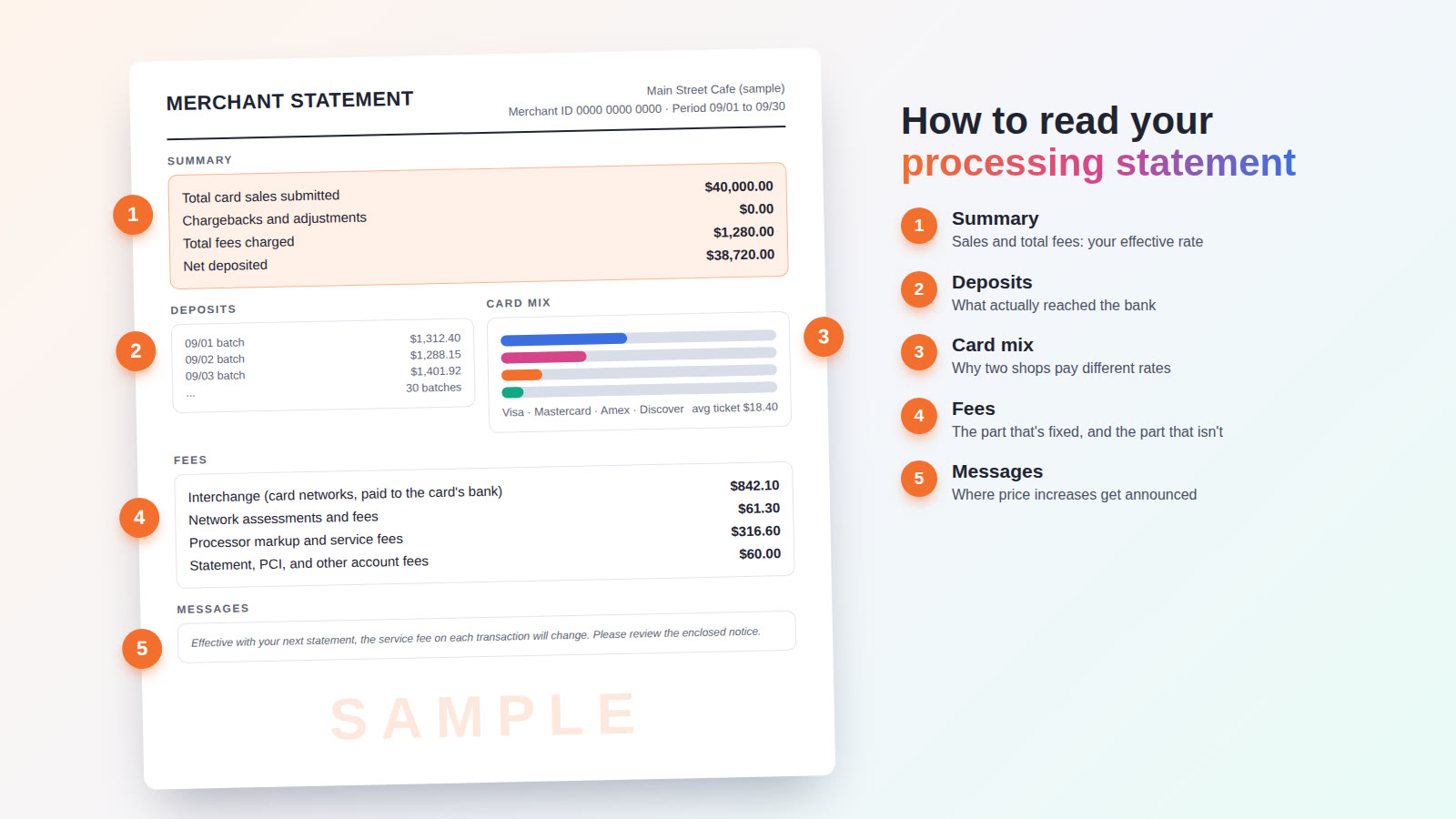
Your processing statement is the only place your card fees are written down. Most owners never read past the first page, and that's understandable: statements run anywhere from four to a dozen pages, every processor lays them out differently, and the fee section reads like a parts catalog.
The good news is that every statement has the same five parts, even when they have different names. Grab last month's statement and follow along. By the end you'll know what you actually paid, where the money went, and which lines are worth a phone call.
1. The summary: find your effective rate
Two numbers on the first page matter more than everything else combined:
- Total card sales. It may be called amount submitted, gross sales, or total volume. It's everything your customers paid you by card that month.
- Total fees. It may be called fees charged, discount, or total charges. It's everything the processor kept.
Divide the fees by the sales and you have your effective rate: the real percentage you paid to take cards, with every fee included. In the sample above, $1,280 in fees on $40,000 in sales is an effective rate of 3.2%.
That one number cuts through every pricing model and every confusing line item. It's also the number to track month to month. If your sales stay about the same and your effective rate keeps creeping up, something changed, and the rest of the statement will tell you what.
One catch. Some processors take their fees out of each day's deposit instead of billing once at the end of the month. When that happens, the fee total on the summary may only show part of what you paid. A quick check: subtract what was deposited from what you sold. If the difference is bigger than the fee total on the page, the rest was taken daily. Some processors also bill monthly fees as a separate debit from your bank account, so glance at your bank statement for a second charge with the processor's name on it.
Upload your statement and our free reader works it out in about 30 seconds. Then a person on our team checks it.
2. Deposits: what actually reached the bank
Most statements list each batch (each day you closed out your terminal or POS) and the amount deposited for it. You don't need to check every line every month, but it's worth comparing a few days against your POS reports. You're looking for three things:
- A day where the deposit is missing or noticeably short
- Money held back, often labeled as a reserve or hold
- Chargebacks, which come out of deposits and usually carry their own fee
While you're on this page, find your merchant ID (often shortened to MID). It's usually near your business name at the top. You'll need it any time you call about your account or ask for a quote.
3. Card mix: why two shops pay different rates
The statement breaks your sales down by card brand (Visa, Mastercard, American Express, Discover) and often by debit and credit, with a count of transactions and an average ticket.
This page explains why two businesses with the same processor can have very different effective rates. Cards don't all cost the same to accept:
- Debit usually costs less than credit. Debit cards from large banks have their interchange capped by federal rules, so they're among the cheapest cards you take.
- Rewards, premium, and business cards cost more. Those points and perks are paid for in interchange.
- How the card is taken matters. A card that's tapped or dipped costs less than a card number typed in by hand or entered online, because keyed sales carry more fraud risk.
- Average ticket matters. Most pricing includes a per-transaction charge, so a coffee shop with a lot of small sales feels those cents more than a furniture store does.
So when someone quotes you a rate, the honest question is: a rate on what card mix? That's why the only fair comparison is your own statement against a written offer.
4. Fees: the part that's fixed, and the part that isn't
This is the long section, and it's where most owners give up. It helps to know that every fee on it falls into one of three layers.
Layer one: interchange
Interchange is paid to the bank that issued your customer's card. Visa, Mastercard, and Discover publish the rates, and American Express sets its own. You'll see long category names like "Visa CPS Retail" or "MC Merit III", each with a percentage and a few cents. Interchange is the same no matter who processes your cards, and it's usually the biggest share of what you pay.
Layer two: network assessments and fees
The card brands also charge their own fees for using their networks. These show up as assessments (a small percentage of volume) plus named fees such as Visa's Fixed Acquirer Network Fee (FANF) or Mastercard's Network Access and Brand Usage fee (NABU). Like interchange, they're set by the card brands, not by your processor.
Layer three: the processor's markup and service fees
Everything else is the processor's pricing, and this is the only layer that changes from one provider to the next. How it appears depends on how your account is priced:
- Flat rate. One percentage and per-transaction charge for every card. Simple to read, but interchange and markup are blended together, so you can't see the markup on its own.
- Tiered. Sales are sorted into qualified, mid-qualified, and non-qualified buckets, and the processor decides which card lands in which bucket. If you see mid-qualified or non-qualified charges every month, that's worth a closer look.
- Interchange plus (also called cost plus). Interchange and network fees are passed through at cost, and the processor's markup is listed separately as a percentage, a per-transaction fee, or both. It's the easiest pricing to audit, because you can see exactly what the processor keeps.
- Cash discount or dual pricing. Your customers who pay by card cover the processing cost through a posted card price, so the processing line on your statement may be near zero. Look at the monthly program fee and make sure your signs and receipts follow California's rules. Our guide to service charges, surcharges, and dual pricing covers the difference.
The account fees at the bottom
Last come the monthly and annual fees. Some are normal; some are worth questioning. The common ones:
- Statement or account fee: a flat monthly charge for the account.
- Monthly minimum: if your processing fees in a month come in under a set amount, you pay the difference. It mostly hits seasonal and slow months.
- PCI compliance fee: a charge for the security program your account must be enrolled in.
- PCI non-compliance fee: a separate, usually larger charge that appears when your annual security questionnaire hasn't been completed. If you see it month after month, it's almost always fixable with a short questionnaire, and it should stop once that's done.
- Batch or settlement fees: a small charge each time you close out.
- Gateway or online fees: charges for online, invoice, or virtual terminal payments.
- Chargeback fees: a fee for each disputed transaction, on top of the disputed amount.
- Annual, regulatory, or compliance fees: once-a-year charges with official-sounding names. Ask what each one pays for.
- Equipment lease or rental: if you see a monthly equipment charge, find out whether it's a rental you can cancel or a lease that runs for years. Our equipment leases page shows how to read one and what it really costs.
A useful rule: if you can't say what a fee is for, ask your processor to explain it in writing. A legitimate fee has a plain answer.
Send us the statement. We'll tell you what each fee is, whether it's normal, and what the same month would cost with us.
5. Messages: where price increases get announced
Most statements end with a box of notices. It's the easiest part to skip and one of the most important. Rate and fee changes are usually announced here, often a month or two before they take effect, in a sentence like "effective with your next statement, the following fees will change."
Read this box every month. If a notice announces an increase you didn't agree to, call before it takes effect, and check your agreement for how much notice your processor has to give.
A five-minute monthly checklist
- Work out your effective rate and compare it with last month.
- Check that deposits roughly match your POS sales.
- Look for mid-qualified or non-qualified charges.
- Look for a PCI non-compliance fee.
- Look for any fee you can't explain, or one that's new.
- Read the messages box for announced changes.
- Check your bank statement for a separate debit from your processor.
The shortcut
If you'd rather not do this by hand, our free statement reader does the first pass in about 30 seconds. Upload a PDF or photos of your statement and it pulls out your effective rate, your total fees, your card mix, and anything that looks like a junk fee. Then a person on our team reads it, and if we can do better, we put it in writing. If you'd like to estimate first, the savings calculator works from three numbers on your statement: card sales, total fees, and average sale.
And if you want the next step after reading your statement, our post on how to reduce payment processing fees covers the options.
Send one statement. A person on our team goes through every line and calls you with what you pay today and what you'd pay with us.