The $29.99 POS Can Cost Far More: How to Find the Real Price
 Paul AdamsNov 14, 20265 min read

A POS advertised at $29.99 a month sounds like an easy decision. But that number is usually just the software subscription. Processing, account fees, and once-a-year charges all come out of the same bank account, and some of them show up on only one statement a year.
What happened with one "$29.99" system
One restaurant POS is widely advertised at $29.99 per terminal per month. Its provider used to bill two separate annual charges, each priced per device. One was $325 per device (capped at three devices). The other was $250 per device (capped at four).
In 2026 the provider rolled both into a single "annual service and maintenance" fee, effective July 1 and billed each August. A consulting firm that audits these statements reported notices of roughly $1,500 to $2,000 a year, with the amount varying by account. In one case it described, a two-device merchant that had paid about $848 a year under the old fees was notified of a $1,500 charge.
Put that next to the sticker price. One terminal at $29.99 a month is $359.88 a year in software. A $1,500 annual fee is more than four times that, and it never appears in the advertised price.
The same provider's own billing glossary also lists a $10 a month increase to the monthly administration fee for existing merchants, starting December 1, 2025. That's another $120 a year.
This isn't really about one brand. Many POS companies and processors charge annual, compliance, or "service" fees. The pattern is what to watch for: a low headline number, with the real cost spread across the rest of the statement.
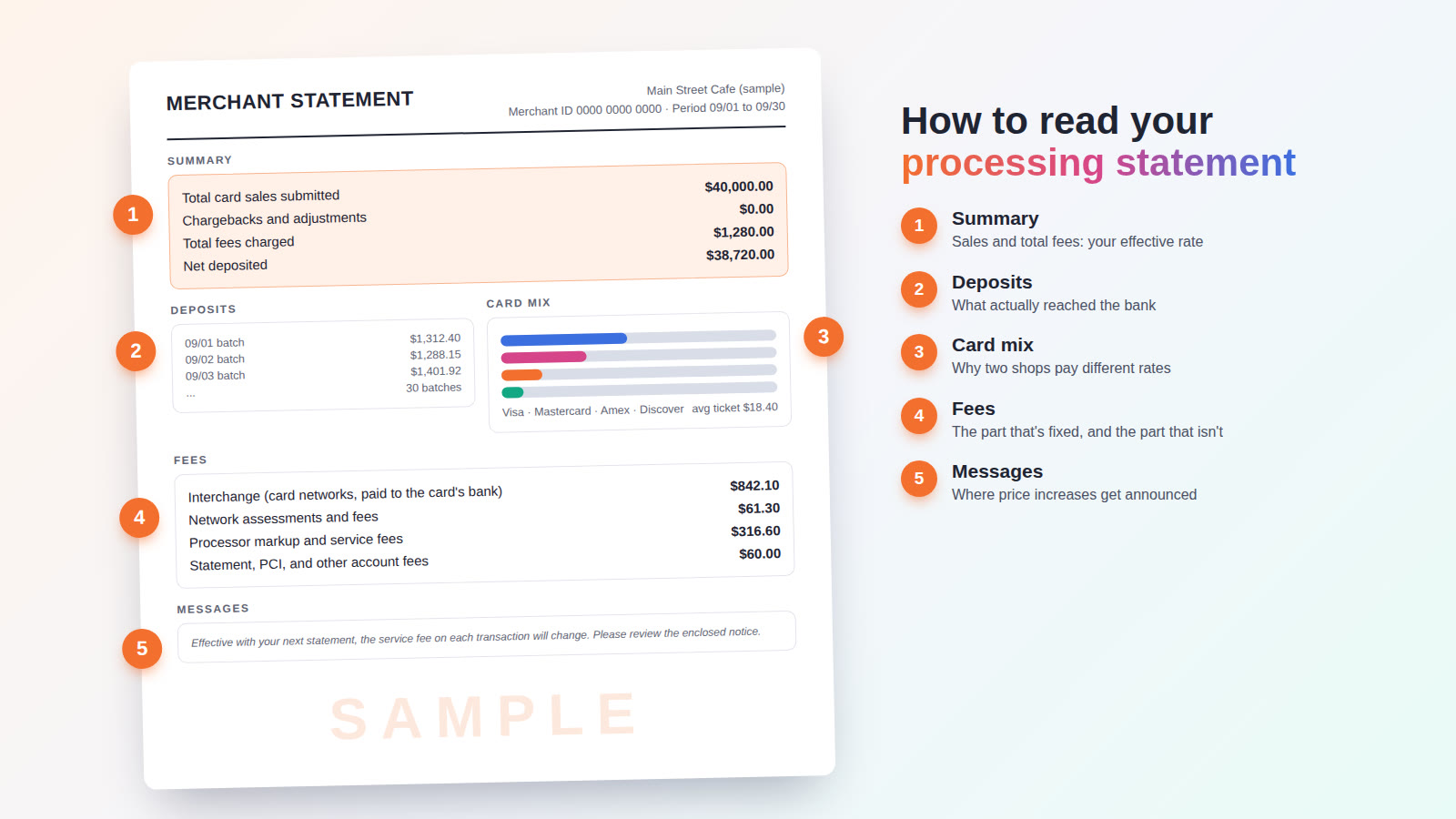
Where annual and "service" fees hide on your statement
Annual fees are easy to miss because they hit once. If you only look at last month's statement, odds are it isn't the month the charge landed. Pull the last 12 months.
Then scan each one for line items like these:
- Annual fee, annual program fee, or membership fee
- Service and maintenance, equipment protection, or warranty fee
- Regulatory, compliance, or "assurance" fees (often named to sound like a government or card brand charge)
- PCI compliance or PCI non-compliance fees
- Monthly administration, account, or statement fees
- Support or "premium support" fees
- Month end billing fees (a percentage some providers add when fees are billed monthly instead of daily)
- Online ordering, delivery, or other "enablement" fees
- Per-terminal or per-device software charges
Check your bank account too, not just the statement. That same provider's glossary notes that some one-time charges are debited directly and may not appear on the statement at all. Equipment leases are often billed separately as well, sometimes by a leasing company rather than your processor.
Know which fees can be negotiated
Interchange is set by the card networks and goes to the bank that issued your customer's card. Every processor passes it through, and nobody can waive it for you. Annual fees, service fees, admin fees, and support fees are different. Your provider sets them, which means your provider can change them, and often can lower or remove them.
When you find one, ask:
- Is this fee in my signed agreement, or was it added later by notice?
- Is it required, and what exactly do I get for it?
- Does it change if I add or remove a terminal or a location?
- Can it be reduced or removed?
Get the answers in writing. A friendly phone call won't help you when the next annual charge posts.
Add up the true 12-month cost
Here's the question to ask any POS or processing provider, including the one you have now: what did I pay you, in total, over the last 12 months? Not the monthly software price. Everything.
A simple worksheet does the job:
| Cost | Where to find it |
|---|---|
| Processing fees | The "total fees" line on each monthly statement |
| POS software | Your statement or a separate software invoice |
| Hardware or lease payments | Lease invoices or your bank account |
| Monthly account, admin, and support fees | The fee section of each statement |
| Annual, service, maintenance, and compliance fees | The one or two statements where they appear |
| Add-ons (online ordering, loyalty, gift cards, kitchen screens) | Statement, invoices, or bank debits |
Add each row for all 12 months, then add the rows together. That total is what your POS and payments actually cost you last year.
Turn it into an effective rate
Your effective rate is your total processing fees divided by your total card sales for the same period. For example, $1,550 in fees on $50,000 in card sales works out to 3.10%.
That's the standard version. To compare POS systems fairly, go one step further and calculate an all-in rate:
All-in rate = (processing fees + POS software + hardware or lease + annual and service fees + add-ons) ÷ card sales
Use a full year of numbers. A month without the annual fee makes your cost look lower than it is, and the month with it makes it look higher. Twelve months evens that out.
Then run the same math on any quote. Ask the new provider to list every fee in writing, including annual and per-device charges, and apply it to your own card volume. Now you're comparing real costs instead of two advertised prices.
If you'd rather not dig through a year of statements yourself, send us a recent one for a free statement review. A real person reads it and calls you back with what you're paying and where. If you move your processing to us, we'll meet or beat your current rate, in writing.
A low sticker price isn't automatically a bad deal
A $29.99 system can still be a good value if the all-in number works and the system earns its keep. An expensive-looking system can also come out cheaper once everything is counted. You can't tell from the ad. You can only tell from the statements.
Look at the contract terms, too. A low monthly price tied to a multi-year agreement with an early termination fee makes it expensive to leave when a new fee shows up. Our accounts are month to month with no early termination fee, and installs and training are included with the POS systems we sell.
A quick checklist
- Pull 12 months of processing statements and bank statements.
- Highlight every annual, service, compliance, admin, and support fee.
- Ask your provider which of those are optional, and get the answers in writing.
- Add up your total 12-month POS and payments cost.
- Divide by your card sales to get your all-in rate.
- Use that number, not the sticker price, when you compare quotes.
Send us one processing statement. A real person reads it and calls you with the answer.